Az Predictor Module – Azure PowerShell Predictions
Azure PowerShell is one of my preferred ways to build automation and manage Microsoft Azure. However, as Damien Caro (Microsoft Program Manager) mentions, the Azure PowerShell modules has over 4,000 cmdlets and, on average, ten parameters per cmdlet. This can make it hard to find the right cmdlet and parameter for what you want to do. To make this easier, the team created the Az Predictor, an intelligent command completion module for Azure PowerShell. Az Predictor will help you with predictions when you run Azure PowerShell.
In the last couple of days and weeks, I started to try out the new PowerShell Predictive IntelliSense and Az Predictor, and together with the PSReadline version, and I wouldn’t work without it anymore. it kind of reminds me of the AI-supported Azure CLI command in az find.
Az Predictor helps our Azure developers find the cmdlet they are looking for efficiently, identify the required parameters quickly, and experience fewer errors.
We worked closely with the PowerShell team to have Az be the first module that leverages this new interface and bring suggestions to the developer’s fingertips. Az Predictor takes the context of the current session into account in its suggestions. With Az Predictor’s context-aware suggestions users will be guided through the discovery of cmdlets and will not need to go to the online help as often.Damien Caro – Microsoft Program Manager
You can read more in the official announcement blog on Microsoft Tech Community.
Az Predictior Modes for Azure PowerShell
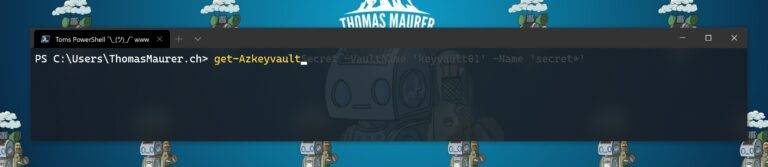
Inline mode – Suggestions of parameters and values will appear on the rest of the command line.
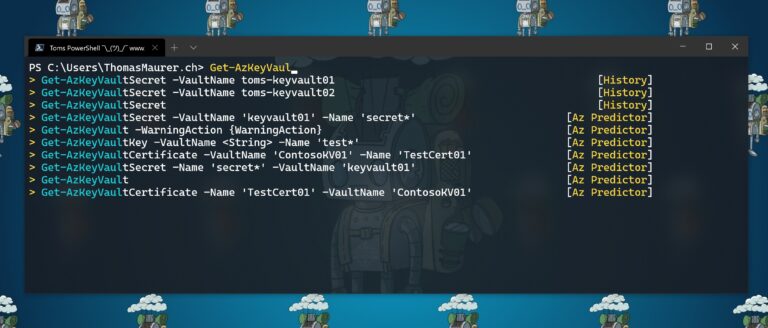
Listview mode – This will show several suggestions below the command line with the complete parameter set displayed.
Getting started with Az Predictor
Az Predictor is currently a module in preview in the PowerShell gallery. It leverages the subsystem plugin model that is available after PowerShell 7.1 and used by PSReadline 2.2.0-beta1.
You can learn more about this in my PowerShell Deep Dive reaction video.
Requirements
Install Az Predictor
To install and get started just follow these easy steps:
- Install PowerShell 7.1
- Install PSReadline 2.2-beta1
Install-Module PSReadline -AllowPrerelease - Install Az.Tools.Predictor preview
Install-Module -Name Az.Tools.Predictor - Import Module
Import-Module Az.Tools.Predictor - Enable the plugins
Set-PSReadLineOption -PredictionSource HistoryAndPlugin - Enable the list view mode (Optional)
Set-PSReadLineOption -PredictionViewStyle ListView
If you want to load Az predictor every time you start PowerShell (and trust me you want that 😉), you can add the last three commands to your PowerShell profile.
Conclusion and Feedback
I hope this blog provides you with an overview of this awesome new module, which allows you to predict your Azure PowerShell commands. The team is currently looking for feedback so log issues, feature requests, or design changes on GitHub, and take a moment to fill this brief survey.
If you have any questions feel free to leave a comment.
Last modified: February 24, 2021
Thomas works as a Senior Cloud Advocate at Microsoft. He engages with the community and customers around the world to share his knowledge and collect feedback to improve the Azure cloud platform. Prior joining the Azure engineering team, Thomas was a Lead Architect and Microsoft MVP, to help architect, implement and promote Microsoft cloud technology.
If you want to know more about Thomas, check out his blog: http://www.thomasmaurer.ch and Twitter: http://www.twitter.com/thomasmaurer
virtualization
via Thomas Maurer https://ift.tt/1P0JLf1
February 25, 2021 at 06:53AM
Thomas Maurer
 Stack IT News