How to run scripts against multiple Azure VMs by using Run Command
I wrote a blog post on how to run scripts in your Azure VM by using Run Command, and explained how handy this feature is to manage Azure virtual machines (VMs). In this blog post, we are going to have a look at how you can run scripts against multiple Azure virtual machines (VMs) by using PowerShell and the Invoke-AzVMRunCommand feature.
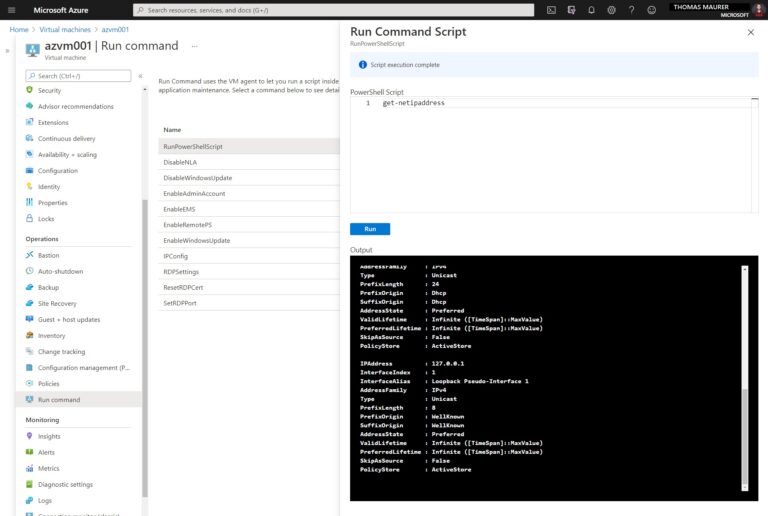
Usually, you can access your Azure virtual machine (VM) in multiple ways, like SSH or RDP. However, if you have issues with the RDP or SSH network configuration, or don’t have any network access at all, the Run Command feature is another option. Run Command can run a PowerShell or shell script within an Azure VM remotely by using the Azure Virtual Machine Agent. This scenario is especially useful when you need to run scripts against Azure VMs where you do not have network access.
You use Run Command for Azure VMs through the Azure portal, REST API, Azure CLI, or PowerShell. Like I showed you in my blog post on Microsoft Tech Community.
Using Azure PowerShell
You can also use Azure PowerShell to use the run command capabilities to run PowerShell scripts against the guest agent inside the Azure VM. For that, you can simply use the Invoke-AzVMRunCommand cmdlet from the Az PowerShell module. You can also run this command directly from Azure Cloud Shell as well.
How to run PowerShell scripts against multiple Azure VMs by using Run Command in Parallel
Now here is how you can use PowerShell 7 and the Azure PowerShell module, to run scripts against multiple Azure VMs in parallel. For that, I am using a simple Foreach-Object to run the script in “script.ps1” against all my Azure VMs in a specific resource group. By default, this would take some time because it would run through all the virtual machines in sequential order. However, with PowerShell 7 we can use the -Parallel parameter to run the commands in parallel.
#Azure Subscription I want to use
$subscriptionId = "XXXXXXX-XXXX-XXXX-XXXX-XXXXXXXXXXXX"
#Resource Group my VMs are in
$resourceGroup = "test-azurevms-rg"

#Select the right Azure subscription
Set-AzContext -Subscription $subscriptionId

#Get all Azure VMs which are in running state and are running Windows
$myAzureVMs = Get-AzVM -ResourceGroupName $resourceGroup -status | Where-Object {$_.PowerState -eq "VM running" -and $_.StorageProfile.OSDisk.OSType -eq "Windows"}

#Run the scirpt again all VMs in parallel
$myAzureVMs | ForEach-Object -Parallel {
    $out = Invoke-AzVMRunCommand `
        -ResourceGroupName $_.ResourceGroupName `
        -Name $_.Name  `
        -CommandId 'RunPowerShellScript' `
        -ScriptPath .\script.ps1
    #Formating the Output with the VM name
    $output = $_.Name + " " + $out.Value[0].Message
    $output
}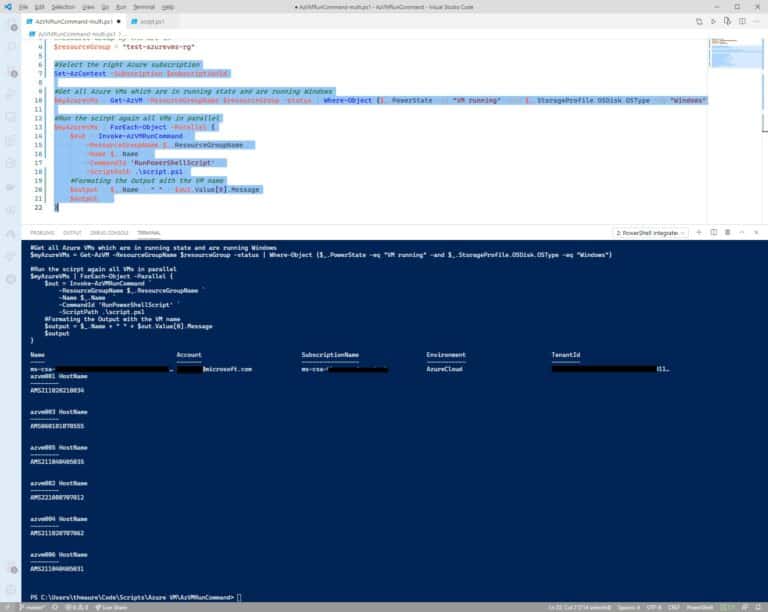
I also modified the output, so it shows the VM name I have run the script against, and I selected only the Message output of Invoke-AzVMRunCommand.
You can also check out my video on YouTube:
Conclusion
I hope this blog post helps you to run PowerShell scripts against multiple Azure virtual machines (VM) in parallel using the VM run command. If you have any questions feel free to leave a comment.
Tags:
,
,
,
,
,
,
,
,
,
,
,
VM Last modified: March 18, 2021
Thomas works as a Senior Cloud Advocate at Microsoft. He engages with the community and customers around the world to share his knowledge and collect feedback to improve the Azure cloud platform. Prior joining the Azure engineering team, Thomas was a Lead Architect and Microsoft MVP, to help architect, implement and promote Microsoft cloud technology.
If you want to know more about Thomas, check out his blog: http://www.thomasmaurer.ch and Twitter: http://www.twitter.com/thomasmaurer
March 16, 2021•
Windows Server
One of the big topics for IT Pros is how they can leverage containers to modernize their application landscape. Getting started with that…
March 11, 2021•
PowerShell
Sometimes you want to know how long your system is running. There are multiple ways to get the uptime of your system using the GUI or…
March 9, 2021•
Microsoft Azure
In my last blog post on Azure Governance, I wrote about how you can use Azure Policy to keep control of your Azure environment. In this…
March 3, 2021•
Microsoft Azure
In this episode of Azure Unblogged, Thomas Maurer speaks with @liorkamrat about the Azure Arc Jumpstart…
virtualization
via Thomas Maurer https://ift.tt/1P0JLf1
March 18, 2021 at 08:33AM
Thomas Maurer
 Stack IT News