Work with WAF v2 and Application Gateway WAF policies on Azure
Azure Application Gateway (AG) is a kind of load balancer that operates at OSI layer 7, which allows us to manage traffic to our web applications. AGs have a lot of useful capabilities, including but not limited to redirection, session affinity, custom error pages, URL-based routing, and web application firewall (WAF). With newer SKUs, such as WAF v2, we can get even more features. One of these features is custom WAF policy support, which allows us to associate a standalone custom policy with a specific Application Gateway listener. In this post, we will look at the WAF v2 tier of the Azure Application Gateway and how we can integrate a custom WAF policy with it.
Onur is a DevOps Engineer and Subject Matter Expert for Azure, and PowerShell. He is the founder of Clouderz Ltd, a cloud consultancy based in London. For eleven years in a row, Microsoft has recognized him as an MVP
). You can follow Onur on Twitter:
.
Latest posts by Baki Onur Okutucu
(see all)
WAF v2 ^
When we spin up a new Application Gateway resource on Azure, we just need to specify which tier we want to go with. There are currently four tiers available on Azure Application Gateways.

Four SKUs available for Application Gateways
The v2 tiers come with new features and some performance enhancements, such as autoscaling, header rewrite, key vault integration, and zone redundancy.
So, if you’re looking to utilize custom WAF policies along with your Application Gateway, then the correct tier to go with is WAFv2.
Setting up Application Gateway components ^
First, let’s create a new Application Gateway with the required components, such as a listener, a probe, and an HTTP rule, in order to publish a sample application. We will run the following commands to create and configure an Application Gateway with a WAFv2 SKU.
|
1 2 3 4 5 6 7 8 9 10 11 12 13 14 15 16 17 18 19 20 21 22 |
### Create Network Resources $ApplicationGatewaySubnetConfig = New–AzVirtualNetworkSubnetConfig –Name ApplicationGatewaySubnet –AddressPrefix 10.0.1.0/24 $ApplicationGatewayBackendSubnetConfig = New–AzVirtualNetworkSubnetConfig –Name myBackendSubnet –AddressPrefix 10.0.2.0/24 New–AzVirtualNetwork –ResourceGroupName WAFv2 –Location UKSouth –Name ApplicationGatewayVNet –AddressPrefix 10.0.0.0/16 –Subnet $ApplicationGatewaySubnetConfig, $ApplicationGatewayBackendSubnetConfig New–AzPublicIpAddress –ResourceGroupName WAFv2 –Location UKSouth –Name ApplicationGatewayPublicIPAddress –AllocationMethod Static –Sku Standard ### Create IP Config $VirtualNetwork = Get–AzVirtualNetwork –ResourceGroupName WAFv2 –Name ApplicationGatewayVNet $Subnet = Get–AzVirtualNetworkSubnetConfig –VirtualNetwork $VirtualNetwork –Name ApplicationGatewaySubnet $PublicIPAddress = Get–AzPublicIPAddress –ResourceGroupName WAFv2 –Name ApplicationGatewayPublicIPAddress $ApplicationGatewayIPConfig = New–AzApplicationGatewayIPConfiguration –Name ApplicationGatewayIPConfig –Subnet $Subnet $ApplicationGatewayFrontendIPConfig = New–AzApplicationGatewayFrontendIPConfig –Name ApplicationGatewayFrontendIPConfig –PublicIPAddress $PublicIPAddress $ApplicationGatewayFrontendPort = New–AzApplicationGatewayFrontendPort –Name ApplicationGatewayFrontendPort –Port 80 ### Create Backend Pool $ApplicationGatewayBackendPool = New–AzApplicationGatewayBackendAddressPool –Name ApplicationGatewayBackendPool –BackendFqdns “testwebapp012345.azurewebsites.net” $ApplicationGatewayProbe = New–AzApplicationGatewayProbeConfig –name ApplicationGatewayProbe –Protocol Http –Path / –Interval 30 –Timeout 120 –UnhealthyThreshold 3 –PickHostNameFromBackendHttpSettings $ApplicationGatewayPoolSettings = New–AzApplicationGatewayBackendHttpSetting –Name ApplicationGatewayBackendPoolSetting –Port 80 –Protocol Http –CookieBasedAffinity Enabled –RequestTimeout 30 –PickHostNameFromBackendAddress –Probe $ApplicationGatewayProbe ### Create Listener Config $ApplicationGatewayDefaultListener = New–AzApplicationGatewayHttpListener –Name ApplicationGatewayListener –Protocol Http –FrontendIPConfiguration $ApplicationGatewayFrontendIPConfig –FrontendPort $ApplicationGatewayFrontendPort $ApplicationGatewayFrontendRule = New–AzApplicationGatewayRequestRoutingRule –Name rule1 –RuleType Basic –HttpListener $ApplicationGatewayDefaultListener –BackendAddressPool $ApplicationGatewayBackendPool –BackendHttpSettings $ApplicationGatewayPoolSettings ### Create Application Gateway Object $SKU = New–AzApplicationGatewaySku –Name WAF_v2 –Tier WAF_v2 –Capacity 2 New–AzApplicationGateway –Name ApplicationGatewayWAFv2 –ResourceGroupName WAFv2 –Location UKSouth –BackendAddressPools $ApplicationGatewayBackendPool –BackendHttpSettingsCollection $ApplicationGatewayPoolSettings –FrontendIpConfigurations $ApplicationGatewayFrontendIPConfig –GatewayIpConfigurations $ApplicationGatewayIPConfig –FrontendPorts $ApplicationGatewayFrontendPort –HttpListeners $ApplicationGatewayDefaultListener –RequestRoutingRules $ApplicationGatewayFrontendRule –Sku $sku –Probes $ApplicationGatewayProbe |
Once the Application Gateway and its components have been deployed, we should be able to access the application using the Application Gateway’s public IP. Note that the application’s custom domain should point to this public IP address. To confirm the functionality, we can simply browse the application by its public URL and access the website.

The application is accessible through the Application Gateway
Creating and configuring a custom WAF policy ^
Custom WAF policies are standalone Azure resources that we can associate with an Application Gateway or a specific listener in an Application Gateway.
A custom WAF policy has four sections.
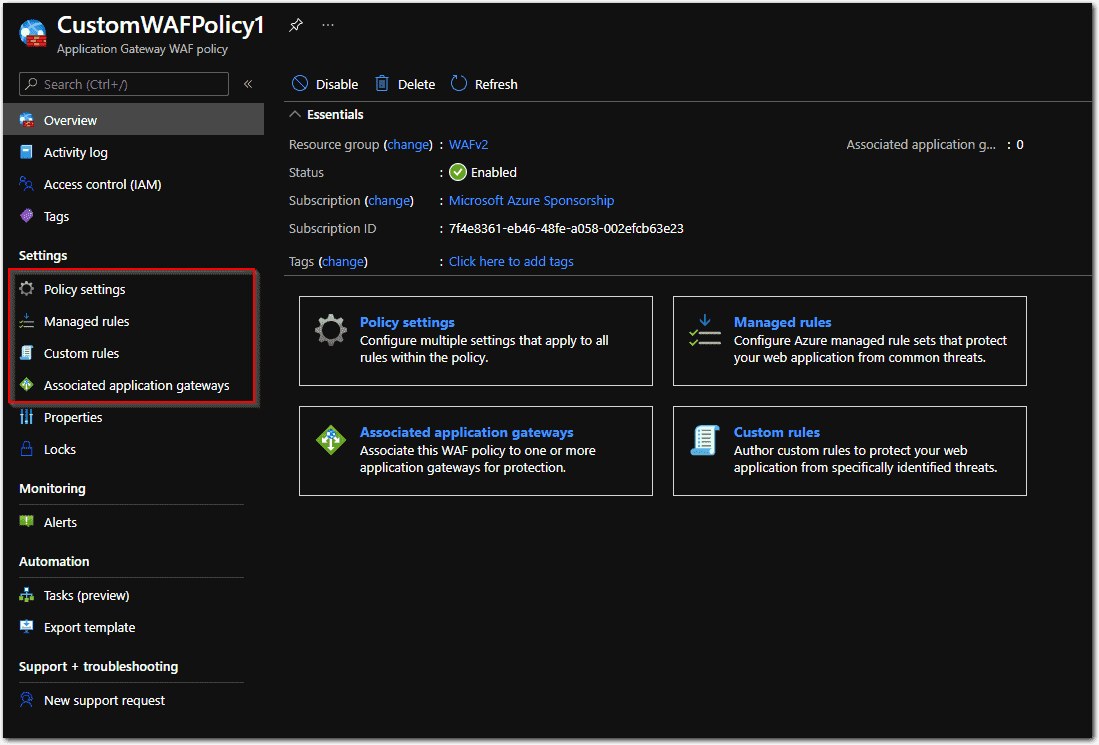
Custom WAF policy components
Policy settings: This is where we set the policy mode (i.e., Prevention, Detection) and some other global parameters, such as max request body size or max upload size. When Detection mode is selected, the WAF policy will only monitor the requests and create logs; it will NOT block anything, even if the rules in the policy are set to block certain requests.
Managed rules: These are the preconfigured rule sets to protect web applications. These rule sets are managed by the Azure WAF service. We can only enable or disable some preconfigured rules in the managed rule sets. For example, we can disable “SQL Injection Attack” protection.
Custom rules: These are user-defined rules that can be customized based on specific conditions to allow or deny access to web applications.
Associated Application Gateways/Listeners: This is the place where we actually associate the WAF policy with a specific listener or an entire Application Gateway.
As mentioned above, with custom rules in a custom WAF policy, we can create custom conditions based on specific variables, such as URL, cookie, RequestHeader, and IPAddress. Using these custom conditions, we can allow or deny access to specific applications. So, to create a custom WAF policy, we first need to create the components in which we specify what we need to allow or deny.
Now, we can create a custom WAF policy and configure a custom rule using a specific rule condition.
In our scenario, we will create a new Custom WAF policy in which we’ll create a custom rule to deny access to the “/denied.html” path. With this, any request to the website that contains the “/denied.html” path in the URL will be denied with a 403 error, but everything else will be allowed. To show a more user-friendly error page to users, we will also use a custom error page, which is a static HTML file that resides in a storage account.
Once the custom WAF policy with the custom rules has been created, we will need to associate this policy with a specific listener on the Application Gateway.
Let’s create a new custom WAF policy and configure it to accomplish the above scenario using the commands below.
|
### Create and Configure a Custom WAF Policy
# Create a Policy Setting $PolicySetting = New–AzApplicationGatewayFirewallPolicySetting –Mode Prevention –State Enabled # Create a rule to deny access to a specific path in the requestUri $Variable = New–AzApplicationGatewayFirewallMatchVariable –VariableName RequestUri $Condition = New–AzApplicationGatewayFirewallCondition –MatchVariable $variable –Operator Contains –MatchValue “/denied.html” $Customrule = New–AzApplicationGatewayFirewallCustomRule –Name BlockDeniedURLs –Priority 10 –RuleType MatchRule –MatchCondition $condition –Action Block # Create a Custom WAF Policy $CustomWAFPolicy = New–AzApplicationGatewayFirewallPolicy –Name CustomWAFPolicy1 –ResourceGroup WAFv2 –Location “UKSouth” –CustomRule $Customrule –PolicySetting $PolicySetting
# Associate the New Custom WAF Policy with an Existing Listener on the Application Gateway
$ApplicationGateway = Get–AzApplicationGateway –Name ApplicationGatewayWAFv2 –ResourceGroupName WAFv2 Set–AzApplicationGatewayHttpListener –Name ApplicationGatewayListener –Protocol Http –FrontendIPConfiguration $ApplicationGatewayFrontendIPConfig –FrontendPort $ApplicationGatewayFrontendPort –FirewallPolicy $CustomWAFPolicy –ApplicationGateway $ApplicationGateway Set–AzApplicationGateway –ApplicationGateway $ApplicationGateway |
Confirming functionality ^
Since the new custom WAF policy has already been created and associated with the listener on the Application Gateway, the restricted URL path should be denied, while the other pages should be accessible.
First, let’s try to go to the “/allowed.html” path to confirm we can access it.

image4
A sample page that is not blocked by the WAF
Now, we can try to access “/denied.html.”

image5
The page that is blocked by a custom rule on the WAF policy
It returned 403 as expected, but the issue is that we don’t want users to see this error message. Therefore, we’ll run the following commands to configure the listener on the Application Gateway to use a static error page, a user-friendly HTML file.
|
# Configure a Custom Error Page for 403 Errors $CustomErrorConfig = New–AzApplicationGatewayCustomError –StatusCode 403 –CustomErrorPageUrl “https://ift.tt/3dg6Huw” Set–AzApplicationGatewayHttpListener –Name ApplicationGatewayListener –Protocol Http –FrontendIPConfiguration $ApplicationGatewayFrontendIPConfig –FrontendPort $ApplicationGatewayFrontendPort –FirewallPolicy $CustomWAFPolicy –ApplicationGateway $ApplicationGateway –CustomErrorConfiguration $CustomErrorConfig Set–AzApplicationGateway –ApplicationGateway $ApplicationGateway |
After this change, the following error message is displayed when the user gets 403 errors based on the rule in the custom WAF policy.
Subscribe to our newsletter!

A custom error page for 403 errors
Conclusion ^
In a real-world scenario, we use many applications, each of which may require a different setup and a different set of rules. So, it’s really important to be able to use a custom policy with a completely different set of rules and associate the policy with a specific listener on an Application Gateway that represents an individual application. With the WAFv2 type of Application Gateways and custom WAF rules, we can manage an individual application’s security rules independently.
windows
via 4sysops https://4sysops.com
April 13, 2021 at 04:04PM
Baki Onur Okutucu
 Stack IT News