Read, Modify, and Parse JSON File (Object) with PowerShell
JSON is a popular text-based format for representing and transmitting structured data based on JavaScript object syntax. There are two cmdlets in PowerShell that allow you to work with the JSON data format: ConvertFrom-Json and ConvertTo-Json. Let’s look at how you can use PowerShell to create, read, or modify JSON objects and save them to files.
Data in JSON format is represented as key:value pairs (property nesting is allowed). Suppose you want to write JSON data to a file. Create a JSON structured data object:
$obj = @{
    Name = "Henry"
    Roles = @{
          AD = "Admin"
          SQL = "Report"
      }
      "Company" = "woshub"
  }
Now convert the object to JSON format and save it to a file with a .json extension:
$json = $obj | ConvertTo-Json
 $json | Set-Content -Path C:\PS\userroles.json
You can now read the JSON file:
$json = Get-Content -Path C:\PS\userroles.json -Raw | ConvertFrom-Json
List all JSON object properties:
$json|fl
Or you can get the value of a particular property in a JSON object:
$json.roles.sql
Use the Add-Member command to add a new property to a JSON object:
$json| Add-Member -MemberType NoteProperty -Name "Email" -Value "[email protected]"
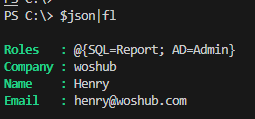
Use the following commands to change a single value in a JSON object and save it to a file:
$json.roles.sql='Admin'
 $json|ConvertTo-Json| Set-Content -Path C:\PS\userroles.json
Remove JSON object property:
$json.PSObject.Properties.Remove("Email")
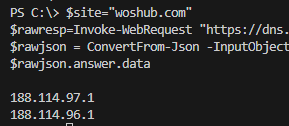
By using the Invoke-WebRequest PowerShell cmdlet, you can access the JSON HTTP API to get data from external web services (sites). For example, to list A records returned by Google’s DNS service in JSON format:
$site="woshub.com"
 $rawresp=Invoke-WebRequest "https://dns.google/resolve?name=$site&type=A"
 $rawjson = ConvertFrom-Json -InputObject $rawresp.Content
 $rawjson.answer.data
powershell,virtualization,windows
via Windows OS Hub https://woshub.com
May 8, 2024 at 07:48AM
admin
 Stack IT News