Cisco WLC 9800 – AAA TACACS+ Configuration for Device Administration (CLI)
In this article, we take a look at the configuration for setting up TACACS+ authentication, authorization, and accounting for Device Administration of Cisco 9800 WLC to cover the login process for SSH, Console port, web GUI, and NETCONF sessions.
For the RADIUS version of this article, please check out the link below:
Cisco WLC 9800 – AAA RADIUS Configuration for Device Administration (CLI)
Introduction
TACACS+ is considered the golden standard for authenticating network administrators and network management systems when they need to log into network devices.
Configuring TACACS+ authentication for the Cisco WLC 9800 is very similar to how it’s done on Cisco switches, but there are some things to consider which we will go through in the configuration down below.
In this article, the following hardware and software was used:
-
Cisco Catalyst WLC C9800-80-K9 running IOS-XE 17.9.5
-
Cisco Catalyst vWLC C9800-CL running IOS-XE 17.9.5
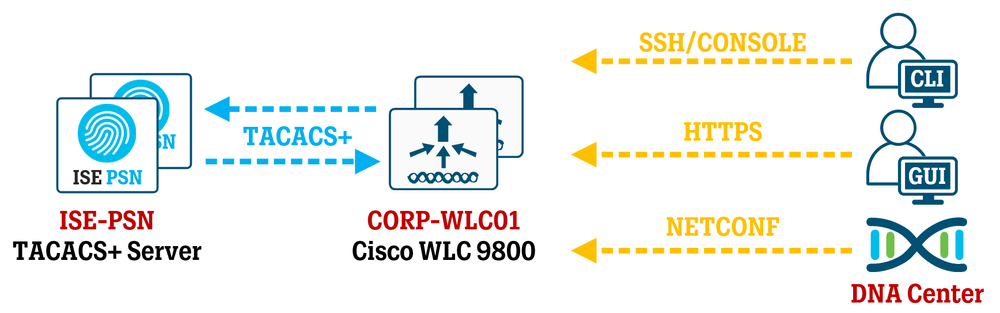
Do note that the configuration below does not perform per-command authorization. This is because it is harder to translate WLC commands into actions in some cases, for example, when the administrator is using the web GUI.
If per-command authorization is enabled, every single command has to be checked against the TACACS+ server which takes time and can make the web GUI run slower since it is essentially built upon several “show” commands being run in the background and presented to the web GUI. Just opening the front page Dashboard of the WLC results in over 50 “show” commands being executed.
While you can turn on/off authorization on a per-command or privilege level basis, it would probably require some time to dig deep into which commands represent which parts of the web GUI.
Configuring TACACS+ Server
Configuration of the TACACS+ server will not be covered in this article, but you can take a look at this link to see how TACACS+ can be configured in Cisco ISE to provide different levels of permission, for example, allowing full access to all commands for administrators, or limiting available commands to helpdesk personnel. However, please keep in mind what was stated above in the introduction regarding per-command authorization.
Cisco ISE – Configuring TACACS+ Authentication for Device Administration
If necessary, create specific Device Administration Policy Sets or rules by matching on parameters such as Device Type = WLC (for example) to customize authentication and authorization according to your needs.
Make sure you are assigning privilege level 15 in all use cases and then use command sets to limit which commands can be used (if needed). For example, NETCONF connections for DNA Center to WLC 9800 require the privilege level to be set to 15, otherwise it won’t work.
Configuring AAA on Cisco WLC 9800
For some further commentary on what some of the commands below will do, you can find some information in another article of mine covering similar configurations for Cisco switches:
SOLID CONFIG: Cisco AAA TACACS and Password Best Practices
! Create local fallback account:
username netadmin privilege 15 algorithm-type sha256 secret ciscodisco123!
enable algorithm-type sha256 secret DISCO123!
! Enable AAA services:
aaa new-model
! Configure TACACS+ servers:
tacacs server TAC-SERVER-1
address ipv4 10.10.10.101
key T4CS3CR3T123!!
timeout 1
tacacs server TAC-SERVER-2
address ipv4 10.10.10.102
key T4CS3CR3T123!!
timeout 1
! Configure TACACS+ Server Group:
aaa group server tacacs+ SG-TAC-SERVERS
server name TAC-SERVER-1
server name TAC-SERVER-2
If your WLC has multiple L3 interfaces and/or VRFs, you may need to use the additional commands below inside "aaa group server tacacs SG-TAC-SERVERS":
aaa group server tacacs+ SG-TAC-SERVERS
ip vrf forwarding MGMT
ip tacacs source-interface Vlan X
You should now choose the order of your authentication process which determines how to handle TACACS+ server failure and Local User Accounts on the WLC.
There are two alternatives presented below and Alternative 1 is generally considered the better way to handle authentication to counter abuse of Local User Accounts, which can be harder to audit the usage of.
! Alternative 1:
! Create Method List to use TACACS+ logins primarly.
! Fallback to Local User Accounts ONLY if all TACACS+ servers fail.
aaa authentication login ML-TACACS-AUTHC group SG-TAC-SERVERS local
aaa authorization exec ML-TACACS-AUTHZ group SG-TAC-SERVERS local if-authenticated
aaa authorization console
! Alternative 2:
! Create Method List to always try Local User Accounts first.
! If login does not match a Local User Account, send it to TACACS+ server.
aaa authentication login ML-TACACS-AUTHC local group SG-TAC-SERVERS
aaa authorization exec ML-TACACS-AUTHZ local group SG-TAC-SERVERS if-authenticated
aaa authorization console
! Configure Accounting regardless of which alternative above was used.
! Use the "default" configuration to include any connection type (SSH, HTTPS, NETCONF).
aaa accounting commands 0 default start-stop group SG-TAC-SERVERS
aaa accounting commands 1 default start-stop group SG-TAC-SERVERS
aaa accounting commands 15 default start-stop group SG-TAC-SERVERS
! At this point, we are going to start activating TACACS+ for different services.
! Activate AAA TACACS+ for HTTPS Web GUI:
ip http authentication aaa login-authentication ML-TACACS-AUTHC
ip http authentication aaa exec-authorization ML-TACACS-AUTHZ
! Activate AAA TACACS+ for NETCONF/RESTCONF authentication (17.9.1+)
! Without this config, the WLC will use the global default authentication method.
! There is no way to specify Accounting for YANG, which is why "default" was used earlier.
yang-interfaces aaa authentication method-list ML-TACACS-AUTHC
yang-interfaces aaa authorization method-list ML-TACACS-AUTHZ
! Restart HTTP/HTTPS services:
no ip http server
no ip http secure-server
ip http server
ip http secure-server
! Activate AAA TACACS+ authentication for SSH sessions:
line vty 0 97
exec-timeout 30 0
login authentication ML-TACACS-AUTHC
authorization exec ML-TACACS-AUTHZ
transport preferred none
transport input ssh
transport output none
! Activate AAA TACACS+ authentication for the Console port:
line con 0
exec-timeout 15 0
transport preferred none
login authentication ML-TACACS-AUTHC
authorization exec ML-TACACS-AUTHZ
Verification
Try authenticating to the WLC using TACACS+ credentials and verify that the authentication is successful. Use the command “show privilege” to confirm that the correct Privilege Level (should be 15) is assigned.
To test the local user account used for fallback login, break the network path between the WLC and the TACACS+ server, and then make sure you can use the local user account to log in to the WLC.
networks
via Blog – WIRES AND WI.FI https://ift.tt/WMifqNP
June 1, 2024 at 10:03AM
Jacob Fredriksson
 Stack IT News