PowerShell basics: Query Windows Server Event Logs
One of the most standard server administration tasks is trawling through event logs looking for information about an issue you want to troubleshoot. If you’re interacting with Windows Server through PowerShell, you can interact with those event logs using the Get-EventLog, Clear-EventLog, Limit-EventLog, New-EventLog, Remove-EventLog, Show-EventLog and Write-EvengLog cmdlets.
You’re most likely to use Get-Eventlog most often. To view which event logs are available, run the command

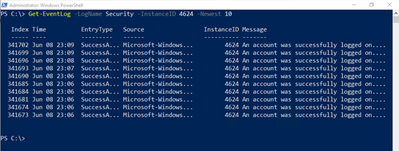
To pull up event log entries that have a specific type, use the InstanceID parameter. For example, to see the last 10 successful log on events in the Security event log (ID 4624) run the command:
To search an event log for specific words in the event log message, use the Message parameter. For example, to search the Security event log for the word Logoff, use the following command:

Get-EventLog is a very useful cmdlet and you’ll definitely use it when working with Server Core machines, or if you just want to check if specific events have occurred on computers you manage.
Learn more
- Get-EventLog at docs.microsoft.com
- Introduction to PowerShell on Microsoft Learn
-
OPS117: PowerShell Deep Dive
microsoft
via ITOps Talk Blog articles https://ift.tt/2NpRnyb
June 9, 2021 at 11:01AM
OrinThomas
 Stack IT News