Azure Kubernetes Services – Start & Stop Your AKS Cluster on Schedule using Azure Automation
Hi everybody, here I am again to show you a possible way to start and stop your AKS cluster on schedule.
This could be something important if you’re aiming at saving money and are in the middle of a Microsoft Azure Well-Architected Cost Optimization review. Say for example that you have a dev environment for which you don’t need the resources to be up & running during the night or outside of normal working hours.
Helping customer in saving money or, even better, in spending them diligently is part of the mission we are all called to. If you can help customers to save money, they will be more inclined to invest that saving into other Azure services or by using additional resources. Hence, in the end, it’s not a bad idea but instead a great example of customer care. I came across this scenario during a customer engagement and since I am not Kubernetes (or container) expert, I asked my colleague Michele Ferracin some help. Hence credits to Michele 
So far, the Azure portal does not provide any scheduled approach to start or stop your AKS cluster in the Kubernetes Service blade:

But the goal can be reached by either using Azure CLI as documented in the Stop and Start an Azure Kubernetes Service (AKS) cluster page or by using the REST APIs as per:
Of course, doing this kind of operations on a cluster has some limitations which well explained in the Microsoft documentation and briefly reported below:

But question is still: How can you get this done? You can take advantage of the great integration offered by Azure. Azure Automation, in this case, is your friend and since there are no PowerShell modules or cmdlets available for this purpose we will be forced to work with the REST APIs. I proposed that solution to a customer that was exactly asking the question: How can I stop the AKS cluster on my dev environment during night to save money?
Given that, what should you do to put this solution in place? All you need is to create a new automation runbook in a new or existing automation account. The technical pre-req here is that you need to have the Az.Accounts module added to the Modules shared resource in your Automation Account

Assuming that you are all set (the AKS cluster in place, the authentication mechanism is working perfectly, and your permissions are set), you can import the PowerShell code below into a new runbook and schedule it as required.
As per the parameter section in the script, it will require some inputs in order to be executed. When you will run the runbook (on-demand or on schedule) you’ll need to enter the following specific info:

The runbook will first check if the required operation on the given cluster can be performed. For instance, if you requested to stop the cluster and the cluster is already stopped, the runbook produce some log entries similar to those below:

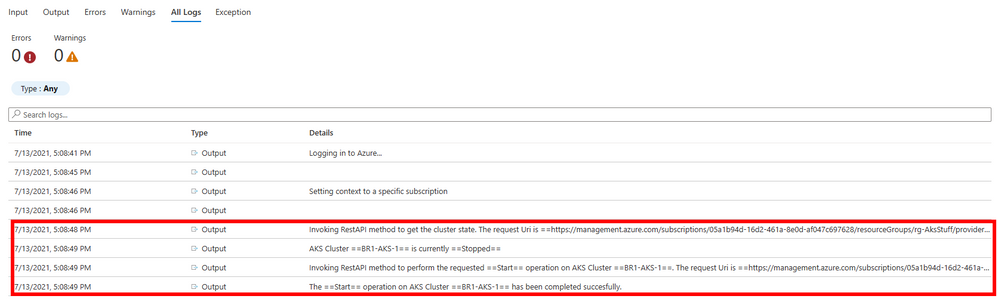
If the cluster was in the Stopped state and your request is to start it, then the runbook will go ahead and you will see logs similar to the screenshot below:
As I have been doing in all of my posts, I strongly recommend you to TEST, TEST, TEST before using it in production.
Thanks for reading as always 
Disclaimer
The sample scripts are not supported under any Microsoft standard support program or service. The sample scripts are provided AS IS without warranty of any kind. Microsoft further disclaims all implied warranties including, without limitation, any implied warranties of merchantability or of fitness for a particular purpose. The entire risk arising out of the use or performance of the sample scripts and documentation remains with you. In no event shall Microsoft, its authors, or anyone else involved in the creation, production, or delivery of the scripts be liable for any damages whatsoever (including, without limitation, damages for loss of business profits, business interruption, loss of business information, or other pecuniary loss) arising out of the use of or inability to use the sample scripts or documentation, even if Microsoft has been advised of the possibility of such damages.
virtualization,windows,microsoft
via Core Infrastructure and Security Blog articles https://ift.tt/2tjvx8h
July 29, 2021 at 08:03AM
Bruno Gabrielli
 Stack IT News