Microsoft Azure AD Sync service fails to start – event id 528
Introduction
On Windows Server 2019 and Windows Server 2022 running AD Connect v2, I have been seeing an issue since October/November 2021 where Microsoft Azure AD Sync service fails to start – event id 528. It does not happen in every environment, but it does not seem to go away when it does. It manifests clearly by the Microsoft Azure AD Sync service failing to start after a reboot. If you do application-consistent backups or snapshots, you will notice errors related to the SQL Server VSS writer even before the reboot leaves the Microsoft Azure AD Sync service in a bad state. All this made backups a candidate for the cause. But that does not seem to be the case.
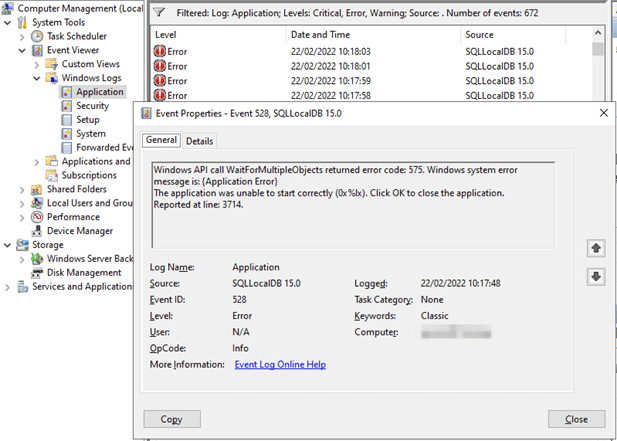
In the application event log, you’ll find Event ID 528 from SQLLocalDB 15.0 with the below content.
Windows API call WaitForMultipleObjects returned error code: 575. Windows system error message is: {Application Error}
The application was unable to start correctly (0x%lx). Click OK to close the application.
Reported at line: 3714.
Getting the AD Connect Server operational again
So, what does one do? Well, a Veeam Vanguard turns to Veeam and restores the VM from a restore point that a recent known good AD Connect installation.
But then the issue comes back
But then it comes back. Even worse, the AD Connect staging server suffers the same fate. So, again, we restore from backups. And guess what, a couple of weeks later, it happens again. So, you rebuild clean AD Connect VMs, and it happens again. We upgraded to every new version of AD Connect but no joy. You could think it was caused by failed updates or such, but no.
The most dangerous time is when the AD Connect service restarts. Usually that is during a reboot, often after monthly patching.
Our backup reports a failure with the application consistent backup of the AD Connect Server, often before Azure does so. The backup notices the issues with LocalDB before the AD Sync Service fails to start due to the problems. However, if you reboot enough, you can sometimes trigger the error. No backups are involved, it seems. That means it is not related to Veeam or any other application consistent backup. The backup process just stumbles over the LocalDB issue. It does not cause it. The error returns if we turn off application-consistent backups in Veeam any way. We also have SAN snapshots running, but these do not seem to cause the issue.
We did try all the tricks from an issue a few years back with backing up AD Connect servers. See https://www.veeam.com/kb2911 but even with the trick to prevent the unloading of the user profile
COM+ application stops working when users logs off – Windows Server | Microsoft Docs we could not get rid of the issue.
So backups, VSS, it seems there is a correlation but not causation.
What goes wrong with LocalDB
After a while, and by digging through the event and error logs of a server with the issue, we find that somehow, the model.mdf and model.ldf are toast for some inexplicable reason on a pseudo regular basis.
You’ll find entries like “The log scan number (37:218:29) passed to log scan in database ‘model’ is not valid. This error may indicate data corruption or that the log file (.ldf) does not match the data file (.mdf).”
Bar restoring from backup, the fastest way to recover is to replace the corrupt model DB files with good ones. I will explain the process here because I am sure some of you don’t have a recent, good know backup.
Sure, you can always deploy new AD Connect servers, but that is a bit more involved, and as things are going, they might get corrupted as well. Again, this is not due to cosmic radiation on a one-off server. Now we see it happen sometime three weeks to a month apart, sometimes only a few days apart.
Manual fix by replacing the corrupt model dd files
Once you see the SQLLocalDB event ID 528 entries in the application logs when your Microsoft Azure AD Sync service fails to start, you can do the following. First, check the logs for corruption issues with model DB. You’ll find them. To fix the problem, do the following.
Disable the Microsoft Azure AD Sync service. To stop the service that will hang in “starting” you will need to reboot the host. You can also try and force kill ADSync.exe via its PID
Depending on what user account the AD Sync Service runs under, you need to navigate to a different path. If you run under NT SERVICE\ADSync you need to navigate to
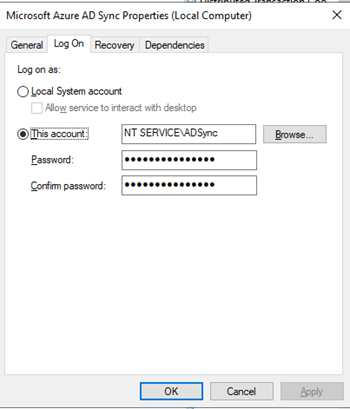
C:\Windows\ServiceProfiles\ADSync\AppData\Local\Microsoft\Microsoft SQL Server Local DB\Instances\ADSync2019
If you don’t use the default account but another one, you need to go to C:\Users\ YOURADSyncUSER\AppData\Local\Microsoft\Microsoft SQL Server Local DB\Instances\ADSync2019
Open a second explorer Windows and navigate to C:\Program Files\Microsoft SQL Server\150\LocalDB\Binn\Templates. From there, you copy the model.mdf and modellog.ldf files and paste those in the folder you opened above, overwriting the existing, corrupt model.mdf and model.ldf files.
You can now change the Microsoft Azure AD Sync service back to start automatically and start the service.
If all goes well, the Microsoft Azure AD Sync service is running, and you can synchronize to your heart’s content.
Conclusion
If this doesn’t get resolved soon, I will automate the process. Just shut down or kill the ADSync process and replace the model.mdf and model.ldf files from a known good copy. That fixes this cause for when Microsoft Azure AD Sync service fails to start – event id 528For now, we keep an eye on it and get alerts from the AD Connect health service in Azure when things break or when event id occurs on the AD Connect servers. Let’s see if Microsoft comes up with anything.
PS: I am not the only one seeing this issue Azure AD Sync Connect keeps getting corrupted – Spiceworks
linux,virtualization,tech,windows,microsoft
via Working Hard In IT https://ift.tt/F1bVdg4
February 22, 2022 at 07:36PM
workinghardinit
 Stack IT News