Five Best Practices for Microsoft 365 Exchange Online Domain Transfers
This post is part of a series highlighting Practical 365 authors who will also be presenting on this topic at The Experts Conference 2022 in Atlanta, September 20-21. Practical 365 is a proud sponsor of TEC and its mission to provide practical and actionable Microsoft 365 insights and training for the IT manager and administrator.
Standardized Exchange Online Accepted Domain Transfers Ensure a Seamless User Experience
Domain Name plays a vital role in your organization because it lays the foundation to support all business applications. For example, it is utilized to establish your corporate identity, email delivery, and authentication. After you have completed your content migration during a cross-tenant consolidation project and your users are working from the new target tenant, it is time to transfer the Exchange Online domain name space to the remaining tenant if it will continue to be used by the new organization. Unlike migrating traditional content such as mail, files, and devices, moving a domain in an office 365 tenant-to-tenant migration is a monolithic, multi-step, and risky procedure. In this guide, you will learn five (5) best practices for moving your domains between Microsoft 365 tenants. These best practices are designed to assist migration administrators in the deployment of a well-orchestrated, standardized process from planning to execution to ensure a seamless user transition with little or no email downtime.
In this blog series, we will provide a detailed project workflow that can be adapted for your project purposes. We will list our top 5 must-do best practices for any upcoming domain move project. Finally, we’ll break it all down into the details you want with a comprehensive set of best practices for you to consider when planning your next Cross-Tenant domain migration project.
Exchange Online Domain Move Project Workflow
The five (5) best practices detailed below coincide with the five (5) major phases of an Exchange Online domain move project. Figure 1 illustrates the end-to-end process through the major milestones of analyzing, planning, piloting, executing, and performing post-migration confirmation and remediation activities.
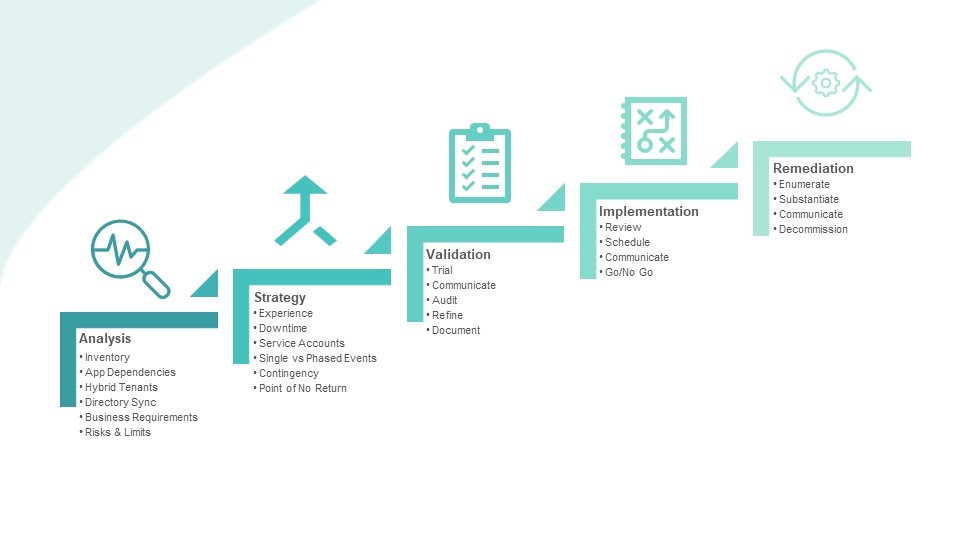
Top 5 Best Practices for Exchange Online Domain Transfers
Analyze
Always start by assembling a complete picture of the environment. – Know what you have. Track the known application and information systems dependencies. Recognize your business needs. Understand the email downtime risks and mitigation strategies.
Strategize
Formulate strategies to address the known pitfalls – Every organization planning a cross-tenant domain move must have answers to these six potential problem areas.
- Plan what type of end-user experience your business requires before, during, and after the migration.
- Plot how email will flow during the period when the domain is removed and transferred.
- Know how this could impact service accounts
- Decide if this environment is the right size for a single (big-bang) event or whether a phased approach will work better due to the size of the enterprise or having multiple domains to move.
- Have a rollback or recovery strategy
- Agree on when is the “point of no return” for any potential rollback to occur.
Validate
Always pilot the process using temporary vanity domains. – You’ve completed your analysis and strategy planning. Now it’s time to put your plan to the test for Exchange Online domain transfers.
- Procure and configure one or more vanity domains to validate the process from end to end.
- Configure directory test objects to meet the pilot requirement.
- Test your communication plan.
- Document end-user experiences before, during, and after the pilot migration
- Complete a dry run of your rollback recovery plan.
- Finally, assess the results, refine the plan based on lessons learned, and fully document the process in a project plan to verify each step along the way.
Implement
Assemble your stakeholders and implementation team so everyone knows the event timetable and the parts they play, and always establish a Go/No Go event bridge.
- Before executing the live event, be sure to fully review in detail the planned processes and strategies with the entire event team. Upon review, decide when it is best to start this event based on business requirements.
- Before starting, meet to decide if all prerequisites are ready and confirm that no new business events are superseding the planned event.
- During the event, communicate with stakeholders throughout each phase and always keep a line of communication open during the event in the form of a triage center. Establish a central phone or meeting bridge where the principal engineers orchestrating the implementation can continuously communicate and where other stakeholders may connect at any time for live status updates.
Remediate
Always make sure it’s working afterward; if not, have the right people in the room to fix it quickly.
- Tally the results of each of the moving parts and ensure all the target objects have their updated address.
- Confirm that mail is flowing in all directions again.
- Repair any anomalies that are identified.
- Compose a final status message to the stakeholders and end-users.
- Finally, mothball the old tenant but only, when necessary, because there is no technical reason that it must be decommissioned directly after the domain move event(s).
Deep Dive of the Analysis Phase
Now let’s dig a little deeper and begin to examine the analysis phase of the project with six (6) best practices specific to assessing your source and target tenants.
It is important to first assess your tenant to understand the full scope of the domain name space footprint within your organization. During this stage, you will identify and document the following key areas:
- Directory Objects – Always assess the tenant and generate a comprehensive inventory report of all objects spanning impacted directories, including a list of users, service principals, contacts, guests, groups, and teams that utilize the domain as an email or SIP address, proxy address or User Principal Name. Understanding the full scope of the domain footprint in your tenant will be required as Microsoft does not allow the removal of the domain from the tenant if it is in use during the transfer. This inventory report will also be a vital part of any contingency planning if recovery is required.
- Application Dependencies – Always identify all the dependencies related to third-party applications that utilize the domain being transferred. Domains will have different functional roles for each affected application. For example, you may have a support ticketing system that utilizes the domain to send or receive email. If any email downtime is unacceptable, then it is considered a business requirement that you ensure the system continues to function during the domain migration. Another very common dependency is automation. IT administrators manage scripts, apps, and service principals to help manage their day-to-day IT operations; however, they will no longer function once the domain is removed from the tenant.
- Hybrid Tenants– Always plan for hybrid organizations that utilize federated authentication or allow mail to transfer between the on-premises Exchange organization and the cloud. As an example, your on-premises Active Directory (AD) may share the same Fully Qualified Domain Name (FQDN) as your tenant, and it is configured with Active Directory Federation Service (ADFS) and Single Sign On (SSO) for your tenant. Your tenant ADFS configuration needs to be modified post- migration if you still plan to have users sign into your source tenant after the domain is moved. In addition, if the domain is used by service accounts configured for Azure AD Connect (AADC) (which allows objects and attributes to be synchronized to the Azure Active Directory) those services will also stop synchronizing.
- Directory Synchronization – When changes made to the on-premises AD are not synchronized to Azure Active Directory (AAD), this will prevent the domain from being removed from your source tenant. Fully understand the directory synchronization configuration topology and rules. AADC plays a vital role during your domain move project. It will be used to ensure object changes are fully synchronized between your on-premises AD and AAD after the domain name is removed from your on-premises remote objects.
- Business Continuity Requirements – Understand your business. Every organization will have different business continuity requirements based on their unique and regulatory requirements. It is paramount to capture input from the key stakeholders within your organization — and often even outside your organization — to both understand their needs and explain to them the known technical limitations and constraints of the project. Generally, all organizations must decide how much, if any, email downtime is acceptable. Other common areas of inquiry shared among all organization types include, but are not limited to: email and calendaring, authentication, hybrid directory integrations, Microsoft Teams meetings, SharePoint sites, and access to most services within Microsoft 365.
- Risks and Limitations – Always rank risks and limitations that may impact the organization’s core business operations. The following list contains the four (4) known risks and limitations that all Microsoft 365 cross-tenant domain migration projects will encounter.
- Email delivery will be delayed while the domain is being moved unless you have an address rewrite solution to manage the flow.
- Projects that fail to complete on time will create downtime in normal business operations.
- A replacement domain must be added when removing the domain references for both Azure Active Directory and Hybrid Azure Active Directory objects. Address conflict may occur if a non-dedicated replacement domain is used. As a result, not all domain references can be removed and could prevent the domain being removed from the tenant.
- End-users may need to re-authenticate their desktop applications post-domain move migration.
What’s Next?
In the next part of this blog series, we will discuss how to formulate a migration strategy by identifying the requirements for the end-user experience, determining how much email downtime is acceptable to the business, classifying service account dependencies, determining which migration path to take, framing your contingency plans, and finally, finding the point of no return where moving forward is the only path remaining.
Join Lenny Yu and Richard Dean at The Experts Conference 2022 in Atlanta, September 20-21 as they explore in-depth “Best Practices for Microsoft 365 Domain Moves.” Check out the agenda here.
exchange
via Practical 365 https://ift.tt/cPi6tBI
June 28, 2022 at 06:27AM
Lenny Yu and Richard Dean
 Stack IT News