StarWind Virtual HCI Appliance Free: Turn Your Servers into a Full HCI Cluster Without Spending a Cent
If you’ve been following my blog for a while (yes, we’re talking back to the early ESXi days), you know I love practical, cost-effective solutions that actually work in the real world — especially for SMBs, ROBO sites, edge locations, or anyone tired of expensive proprietary HCI stacks. Today we’re diving into something that fits that bill perfectly: the StarWind Virtual HCI Appliance (VHCA) Free version.
StarWind has been in the software-defined storage and hyperconverged game for a long time. Their Virtual SAN powers many of the solutions I’ve covered over the years. Now they’ve packaged the same technology that runs their flagship HCI Appliance into a free, downloadable Virtual HCI Appliance that you can drop onto your existing (or new) commodity servers. No time bomb. Perpetual license. Production use is allowed.
Let’s break down what you actually get, how it differs from the paid version, and why this is genuinely useful.
What Exactly Is StarWind Virtual HCI Appliance?
StarWind Virtual HCI Appliance is a pre-packaged software stack that turns a set of standard x86 servers into a fully functional hyperconverged infrastructure cluster. Under the hood you get:
- StarWind Virtual SAN for the shared storage layer
- A choice of hypervisor
- Synchronous replication for high availability
- Web-based management
- Support for industry-standard protocols
It is the same software that powers the physical StarWind HCI Appliance, just delivered as software you install on hardware you already own or buy yourself. Perfect if you want the appliance experience without buying the box.
You can check the official comparison here: StarWind VHCA Free vs Paid.
Example of connection 2 servers (from Quick Start StarWind website).
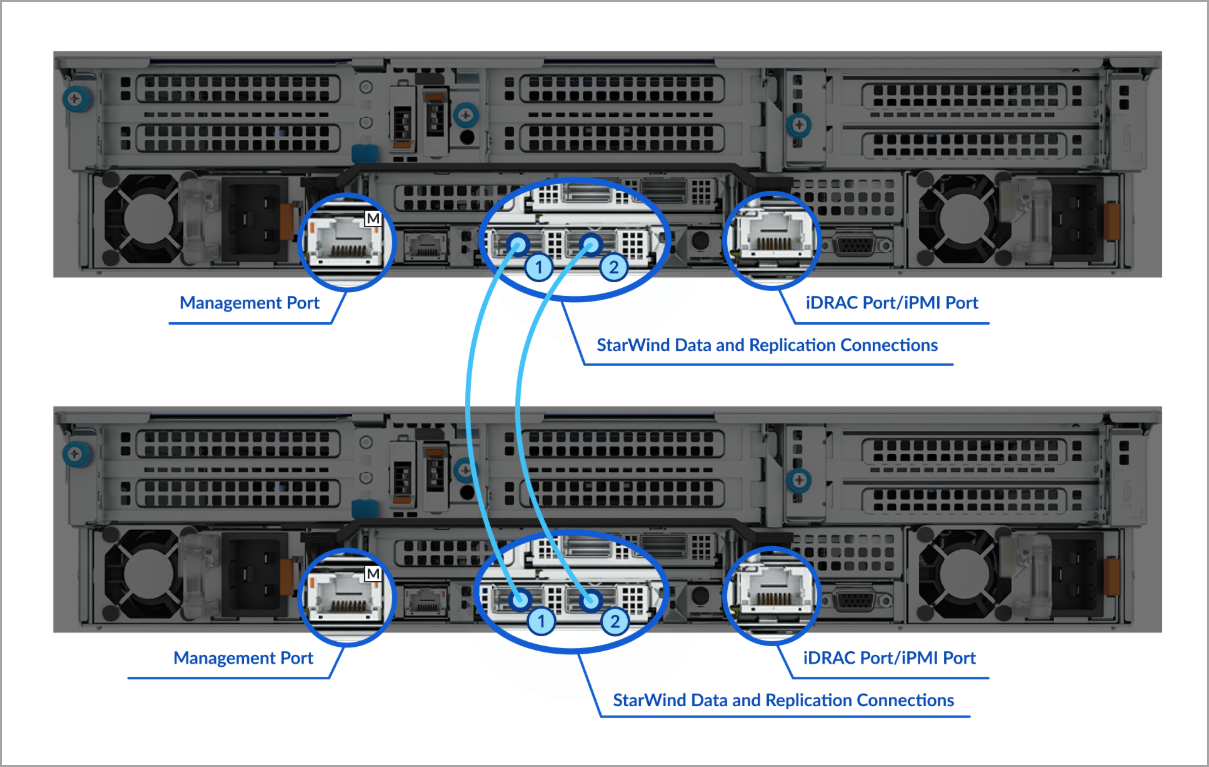
Since the 2-node cluster requires a quorum device, it can be configured during the final cluster setup on the backup server or any computer connected to the cluster.
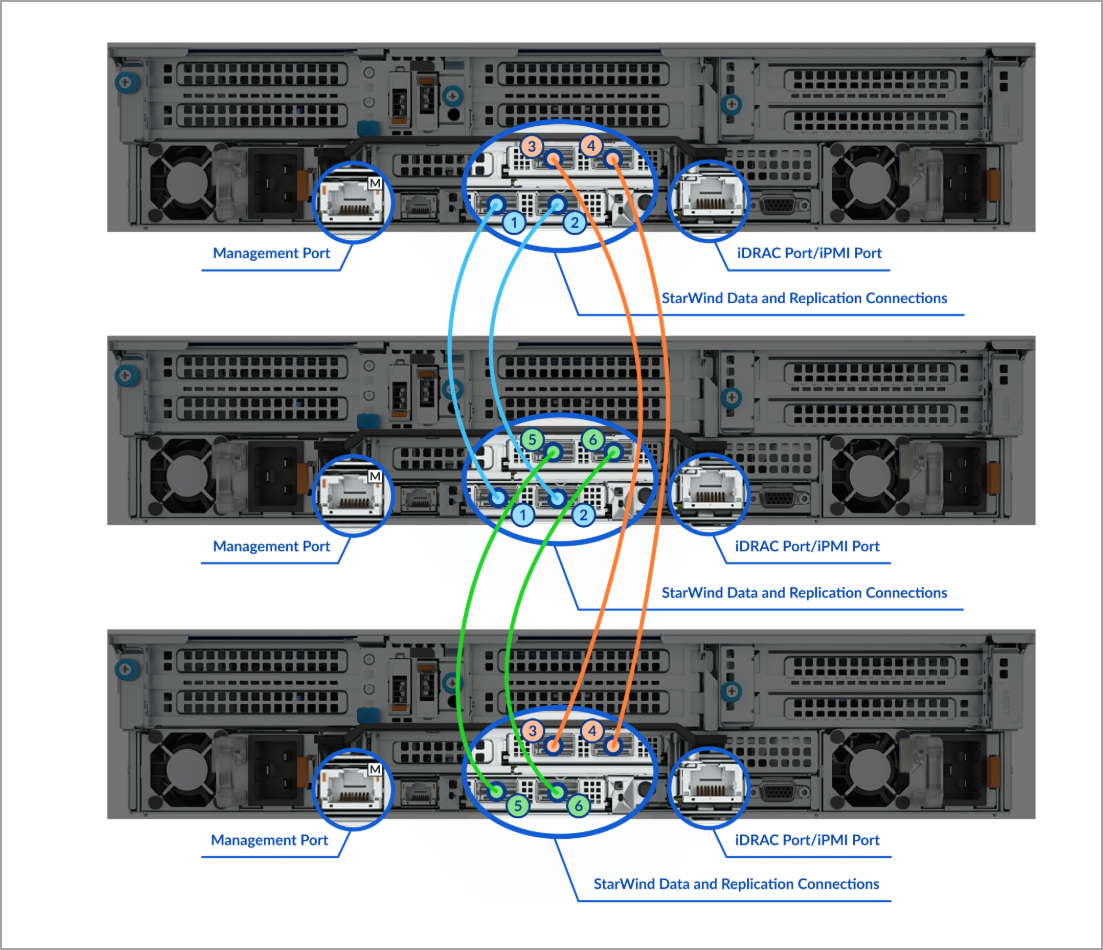
Bellow another example, this time, of connection 3 servers (from Quick start StarWind website).
Free vs Paid: The Real Technical Differences
Here’s the practical breakdown based on StarWind’s feature matrix.
Supported hypervisors
- Free: KVM only
- Paid: KVM, Microsoft Hyper-V, and VMware ESXi/vSphere
This is the biggest limitation of the free edition. If you’re already deep into Proxmox or another KVM-based platform (or happy to move there), you’re golden. If you need Hyper-V or vSphere, you’ll need the paid version.
Management and monitoring
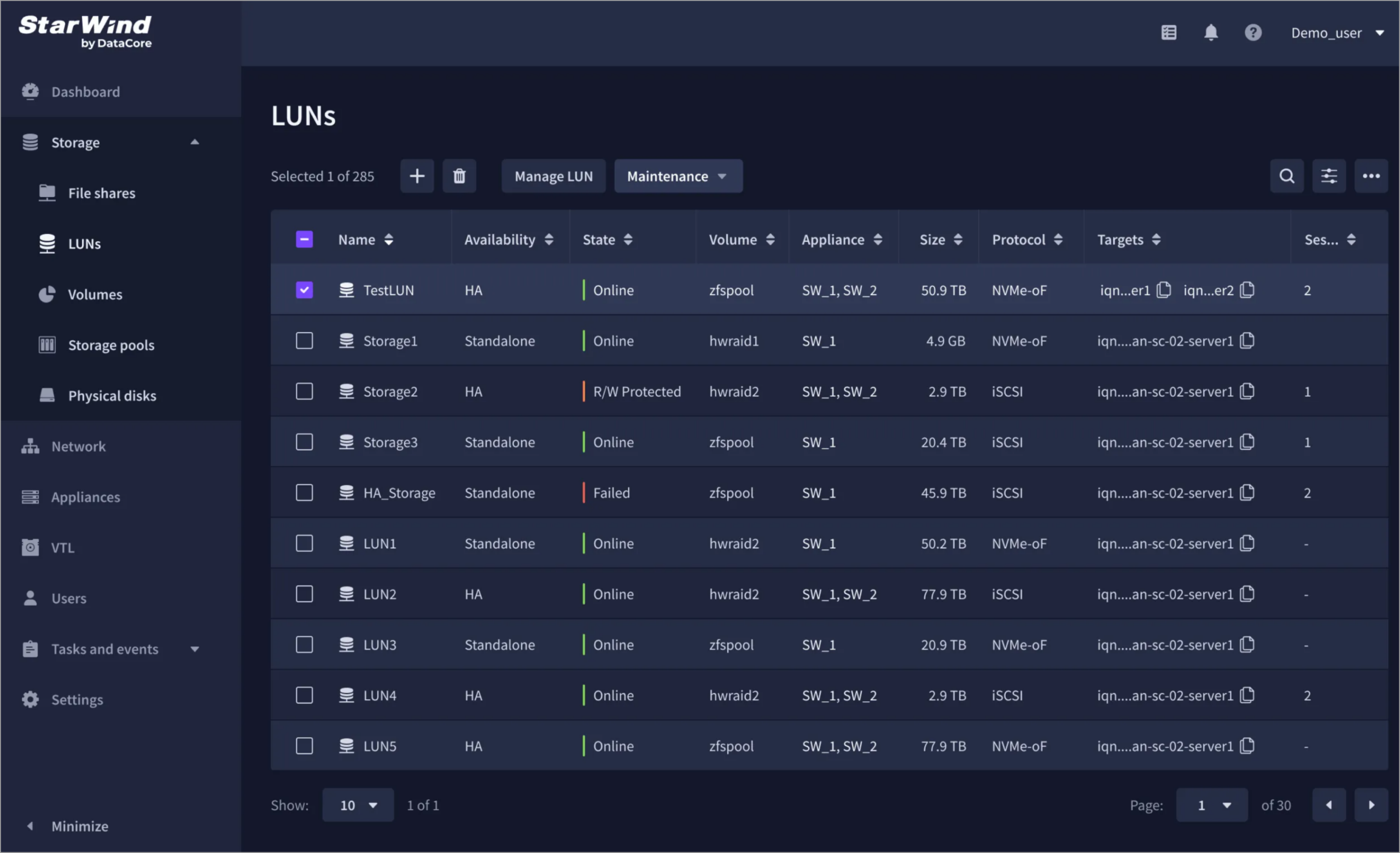
Both versions give you PowerShell CLI. The paid edition adds full Virtual infrastructure management Web UI, Storage management Web UI, and Multi-cluster fleet management Web UI. The free version is more CLI-oriented for day-to-day operations, which is fine for many admins but less convenient if you prefer a pure GUI.
Infrastructure models
Both support true Hyperconverged (compute + storage on the same nodes) and Converged/Disaggregated (compute and storage on different servers). Scale-up (add disks) and scale-out (add nodes) are available in both.
Protocols
- SAN: Both support iSCSI. Paid adds NVMe-oF (over RDMA and TCP).
- NAS: Both support CIFS/SMB3 and NFSv3/NFSv4.
Data protection and redundancy
Both deliver synchronous inter-node replication with instant failover (true HA, starting from two nodes, no witness required). Local redundancy options (Hardware RAID, Software RAID, ZFS RAID on Linux-based deployments) are present in both.
Backup integration
Both integrate seamlessly with Veeam Backup & Replication, including Backup Immutability via the built-in Veeam Hardened Repository integration. This is huge for ransomware resilience.
Support and updates
- Free: Community support via the StarWind forums only. Access to the latest public builds.
- Paid: Standard, Premium, or ProActive Premium support (the latter includes AI-powered telemetry, call-home, and automatic issue detection/resolution — up to 90% of tickets handled without customer intervention).
Production use
The free license is perpetual and production use is permitted. However, StarWind notes that the free version is not recommended as a trial substitute because of the support and management differences. If you’re evaluating for commercial production, grab the proper trial of the paid edition.
Why the Free Version Still Makes a Lot of Sense
For labs, home setups, small production environments running KVM/Proxmox, or proof-of-concept work, the free VHCA is excellent. You get real synchronous HA storage, the same VSAN engine that delivers near-raw performance, and the ability to build a proper two-node (or larger) HCI cluster without buying a traditional SAN or paying for expensive HCI software licenses.
I’ve written extensively about StarWind VSAN over the years — from two-node clusters without a witness, to NVMe-oF targets, to money-saving ROBO deployments. The free VHCA essentially packages that experience into an easier-to-deploy appliance form. If you’ve followed posts like:
… you’ll feel right at home. The free VHCA is the natural evolution of those VSAN deployments into a more turnkey package.
Practical Deployment Notes
You install it on your own servers (or VMs for testing). StarWind provides clear configuration guides for the different hypervisors. For KVM-based setups the free version is fully functional. Networking best practices remain the same as classic StarWind VSAN: separate networks (or VLANs) for management, VM traffic, and the synchronous replication/sync channel. 10 GbE or better is recommended for the sync link; direct-connect works great in two-node designs.
Storage can be passed through as RDM, via HBA passthrough, or using software RAID/ZFS depending on your preference. The usual StarWind guidance applies: keep the CVM (if used) on separate storage and present the data disks cleanly.
Because it supports both HCI and converged modes, you can start small and grow — either by adding capacity to existing nodes or by adding nodes.
When to Go Paid
Choose the paid VHCA if you need:
- Hyper-V or ESXi support
- Full web UIs and multi-cluster fleet management
- NVMe-oF
- Professional support (especially the ProActive Premium tier with telemetry)
- Official production deployment assistance and private builds
The paid version also pairs nicely with the physical StarWind HCI Appliance if you later decide you want a fully integrated hardware + software package.
Final Words
StarWind Virtual HCI Appliance Free is one of the more honest free offerings in the HCI space. It is not a limited demo. You get real synchronous replication, real HA starting from two nodes, and the same storage engine that has been battle-tested for years. The main trade-offs are the KVM-only hypervisor support and community-only support.
If you already run (or are willing to run) KVM/Proxmox and you’re comfortable with forums + PowerShell, this is an outstanding way to modernize aging servers or build a new resilient cluster without a big CapEx hit.
Download it from the official page, spin up a two-node test, and see for yourself. And if you need the full hypervisor choice or enterprise support, the paid path is straightforward.
More StarWind-related posts on the blog if you want to dig deeper into VSAN, VTL, Backup Appliance, or the physical HCA. Stay tuned.
More posts about StarWind:
More posts from ESX Virtualization:
Stay tuned through RSS, and social media channels (Twitter, FB, YouTube)
vmware
via ESX Virtualization https://www.vladan.fr/
August 24, 2026 at 01:41PM
Vladan SEGET

