Understanding the Azure Virtual Desktop Resources
In this post, I will document the resources used in Azure Virtual Desktop.
This is a work-in-progress, so any updates I discover along the way will be added. You should also check out a similar post on Azure Image Builder.
Host Pool – Microsoft.DesktopVirtualization/hostpools
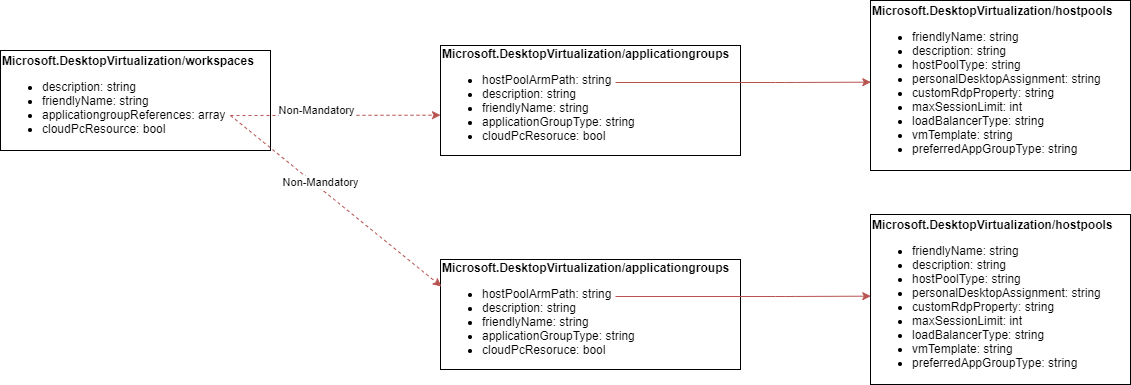
The host pool documents the configuration of the hosts that will provide the desktops/applications. Note that a Host Pool resource ID is required to create an Application Group.
Note, the VMs themselves are deployed using a linked template when you use the Azure Portal. My deployment used the “managed disks” template. This template deploys the VMs, runs some DSC, joins the machines to your domain. There is also a task to update the host pool.
The result of running Microsoft.DesktopVirtualization/hostpools does not create the VMs – it just manages any VMs added to the Host Pool.
The mandatory properties appear to be:
- hostPoolType: BYODesktop, Personal, or Pooled.
- loadBalancerType: BreadthFirst, DepthFirst, or Persistent.
- preferredAppGroupType: Persistent, None, or RailApplications.
The full set of properties can be found in the REST API documentation.
Application Group – Microsoft.DesktopVirtualization/applicationgroups
The Application Group documents the applications, user associations (the Desktop Virtualization User role is assigned to users/groups), and is associated with a Host Pool; therefore you must deploy a Host Pool resource before you deploy the planned Application Group.
The mandatory values appear to be:
- hostPoolArmPath: The resource ID of the associated Host Pool
- applicationGroupType: Desktop or RemoteApp
We know that Windows 365 (AKA “Cloud PC”) is built on Azure Virtual Desktop. Proof of that is in ARM, with a true/false property called cloudPcResource.
The REST API documentation has complete documentation of the properties.
Workspace – Microsoft.DesktopVirtualization/workspaces
The Azure Virtual Desktop Workspace is the glue that holds everything together. The Workspace can be associated with no, 1, or many Application Groups via a non-mandatory array value called applicationGroupReferences. You can build a Workspace before your Application Groups and update this value later. Or you can build the (1) Host Pool(s), (2) Application Group(s), followed by the Workspace.
The mandatory values appear to be:
-
applicationGroupReferences: An array value with 0+ items, each being the resource ID of an Application Group.
The post Understanding the Azure Virtual Desktop Resources first appeared on Aidan Finn, IT Pro.
virtualization,Azure,microsoft
via Aidan Finn, IT Pro https://aidanfinn.com
July 20, 2021 at 11:26AM
AFinn
 Stack IT News